Local-First • Native Rust Engine • Zero Telemetry

Your Notes. Your Files.
Encrypted & Synced via Git.

SlashNote is the lightning-fast, privacy-focused Markdown editor for Desktop & Android. Plain text markdown, dual-branch Git sync, and zero cloud lock-in.

/SLASHNOTE
Notes109
master3 changes
Fri, Aug 28, 2026, 4:18 PM
H1H2H3H4[..]
title: Welcome to SlashNote.md
tags: [rust, git-sync, local-first]

Welcome to SlashNote

High-performance, local-first Markdown editor built for speed, technical documentation, and offline resilience.

CBd=μ0Ienc+μ0ε0dΦEdt\oint_{C} \mathbf{B} \cdot d\boldsymbol{\ell} = \mu_0 I_{\text{enc}} + \mu_0 \varepsilon_0 \frac{d\Phi_E}{dt}
Rust
pub fn sync_vault(vault_path: &Path) -> Result<MergeResult> {
let repo = Repository::open(vault_path)?;
// Embedded libgit2 dual-branch sync loop
let head = repo.head()?.peel_to_commit()?;
perform_three_way_merge(&repo, &head)?;
Ok(MergeResult::CleanSync)
}
Features & Technical Architecture

Built for Performance & Privacy

Native Rust engine execution, local plain-text vault, and transparent 3-way Git sync.

< 50ms startup

Native Rust Engine

Tauri v2 + UniFFI bindings. Sub-50ms cold starts with RAM footprint under 30MB.

Zero Telemetry

100% Local-First

Plain .md files directly on disk. Zero proprietary formats and zero cloud telemetry.

libgit2 Engine

Embedded Git Sync

In-memory libgit2 engine with automated dual-branch 3-way merge protection.

KaTeX + GFM

Pro Developer Suite

First-class KaTeX math formulas, GFM tables, wikilinks, and code syntax highlighting.

Live libgit2 Execution Pipeline
Local .md Vault
Plain Filesystem

Notes live directly on disk as open, plain-text Markdown files inside your chosen local directory.

Monitors file system events in real-time. Any external edit (from VS Code, obsidian, or terminal scripts) is instantly indexed without proprietary wrappers.

Quickstart & Git Setup Guide

Get Started in 3 Simple Steps

No mandatory registration or paywalls. Click Step 02 to jump directly to the Git setup guide.

01

Choose Your Vault

Open any existing local folder containing plain .md files on your disk, or create a brand new vault in seconds.

Step 01Ready
02

Connect Remote Git

Enter your GitHub Personal Access Token or SSH keys to enable private, peer-to-peer sync with zero third-party cloud servers.

Step 02View Setup Guide
03

Write Without Limits

Enjoy instant offline editing, KaTeX math formulas, wikilinks, code blocks, and non-destructive automated dual-branch backup.

Step 03Ready
Direct libgit2 engine • No intermediate servers
Navigation Path:Open SlashNote DesktopSettingsVersion Control
Toggle to ON
HTTPS Protocol
PAT / Credentials

Recommended for standard authentication using your GitHub credentials or Personal Access Token (PAT).

https://github.com/<username>/<repo>.git
SSH Protocol
~/.ssh Keys

Uses your local system SSH keypair (`~/.ssh/id_rsa` or `id_ed25519`) matching your Git configuration.

git@github.com:<username>/<repo>.git
Automatic Branch Detection: SlashNote automatically tracks your active branch (main or master).

GitHub Personal Access Token (PAT) Required ScopesSecurity Info

Where to Generate: GitHub ➔ Settings ➔ Developer Settings ➔ Personal Access Tokens

Classic PAT Scope

Check the repo scope (Full control of private repositories: includes read/write, commit, push, and branch access).

Fine-Grained PAT Permissions

Under Repository Permissions, set Contents to Read and Write.

Security Guarantee: Your PAT is stored securely on your local device only and is used solely to fetch and push your markdown notes directly to your private GitHub repository with zero third-party cloud analytics.

Unified Experience Across Platforms

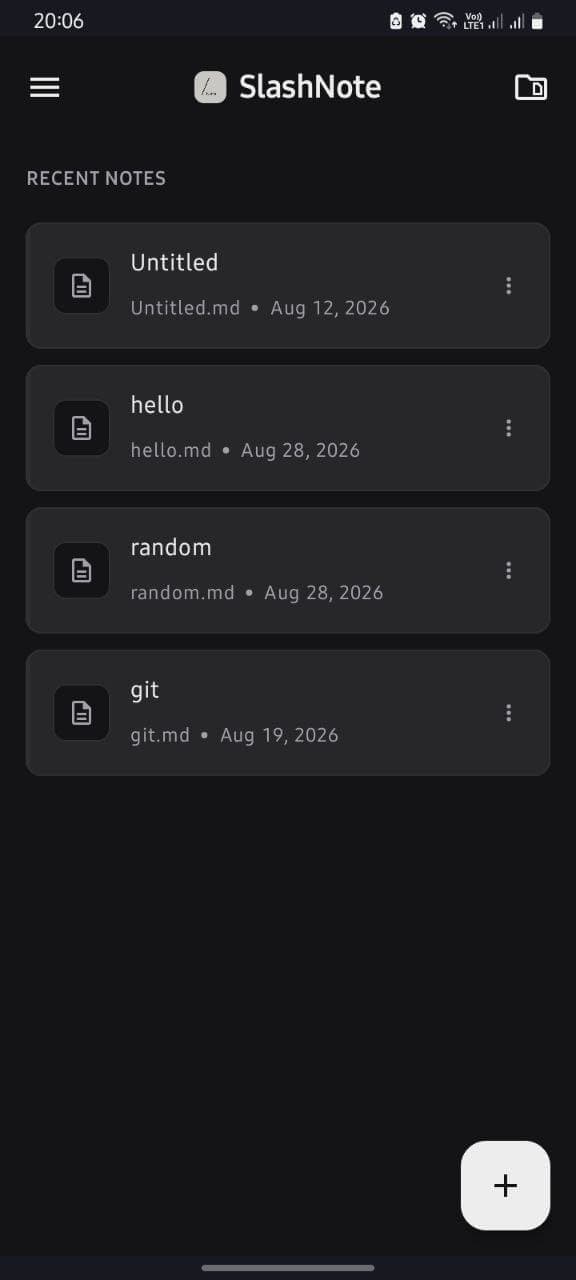
One markdown vault seamlessly synchronized between your high-power desktop workspace and your Android mobile companion.

Desktop ExcellenceTauri v2 + Rust

Side-by-side 2-pane editor with instant live render, Cmd+K command palette, and full vault search.

💡 Desktop Interface: Adapted & edited from open-source project Scratch
Linux, macOS & Windows
SlashNote Desktop Workspace Preview
Cmd+K Global Command Palette for fast note switching.
Multi-window split editing with vim keybindings.
Instant full-text vault search across 10,000+ notes.
Official Production Release v1.0

Get SlashNote for Any Device

Free, local-first, open-core Markdown workspace. Verified release binaries with cryptographic SHA-256 checksums.

Android

9.6 MB
Download Android (9.6 MB)

macOS

7.3 MB

Standalone 64-bit disk image for macOS Intel processors (`x86_64`).

x86_64
Download macOS (7.3 MB)

Windows

5.5 MB
Download Windows (5.5 MB)

Linux

105 MB
Download Linux (105 MB)

Downloads & Verification

Official Release Notes v1.0
Transparent Technical Benchmarks

Outperforming the Status Quo

See how SlashNote compares directly against popular alternatives in speed, privacy, and architectural overhead.

Feature / Benchmark
SlashNote
ObsidianNotion
Cold Startup Time< 50ms (Instant)~ 1 - 3s~ 3 - 5s+
RAM Memory Footprint< 30MB~ 150MB+~ 300MB+
Data Storage FormatPlain .md (Local Files)Plain .md (Local Files)Proprietary Cloud DB
Built-in Git SyncNative libgit2 3-WayThird-party PluginN/A (Cloud Lock-in)
Mobile App Native StackJetpack Compose (Android)Capacitor / WebWebview Wrapper
Telemetry & TrackingZero Telemetry (100% Private)Opt-out AnalyticsFull Data Telemetry
Open Source EngineYes (Open Core)No (Proprietary)No (Closed Source)